New Instant Messaging Service

Visit the Ask A Librarian page http://ask.library.temple.edu to see the latest addition to our suite of services – Instant Messaging (IM).

We have just started a pilot period of offering reference assistance by IM. Librarians can be contacted through four major IM services (AIM, Yahoo, MSN, ICQ) and are available to answer questions or help with research. The best way to know when we are online is to add the library to your buddy list.

The libraries’ usernames are:

AOL Instant Messaging (AIM): AskTULibrary
Yahoo Messenger: AskTULibrary
Microsoft Messenger (MSN): asktulib@temple.edu
ICQ: 225917375

So, send us a message. It’s a quick and easy way to chat with a librarian.

–Derik A. Badman

Paley’s Carol Brigham Elected to IUG

Library automation systems are crucial to the operation of contemporary academic libraries. They provide the searchable online catalogs; the circulation, cataloging, and interlibrary loan systems; and much more. At Temple there are twenty-three university libraries that contain over 2.9 million print volumes that need to be cataloged, shelved, searched, checked out, checked in, placed on reserve, or sent off as interlibrary loans. The explosion of electronic resources in recent years has placed an additional burden on automation systems. Since May 1999, Temple has used automation software from Innovative Interfaces Inc., one of the world’s leading providers with systems installed in diverse libraries in over forty countries.

Librarian Carol Brigham

As with any widely used computer system, Innovative needs to constantly improve, upgrade, and expand its software offerings to libraries. The Innovative Users Group (IUG) was established as an independent entity in 1991 to “serve as a forum to influence the development and improvement of Innovative products for the benefit of IUG members” (quote taken from the IUG web site). Paley Library Access Services librarian Carol Brigham has been involved with IUG since 1988 and was recently elected to a two-year term as an IUG member-at-large, an honor that indicates her high standing within the library community. Previously, Carol served as secretary and member-at-large of the (regional) Middle Atlantic IUG.

As a member-at-large Carol will represent a broad user population from diverse libraries by soliciting, elaborating, organizing, and communicating recommendations for Innovative’s continually evolving automation software, an annual cycle called the “IUG Enhancement Process”. Throughout the year, IUG members make suggestions for enhancements that are then vetted by IUG experts for feasability. The potential enhancements are then sent out to IUG member libraries to vote on. Currently, libraries are casting their ballots for the 2005 enhancements, with a deadline for voting of July 8, 2005. The winning enhancements will then be sent to Innovative for implementation. Facilitating this process takes deep technical knowledge, excellent communicaton skills, an understanding of the working milieus of many different types of libraries, and a whole lot of patience. Carol will do a great job! She will also play a role at IUG conferences and events. At the most recent national IUG meeting in San Francisco, Carol coordinated and was a panelist on two circulation forums.

Carol came to Temple from LaSalle five years ago and has made a big impact on Paley operations where she helps to formulate Access Services policies, works on special projects, and generally aims at improving operational efficiency. If you’ve ever been to the Circulation Desk in Tuttleman you’ve probably seen Carol. Take a look at her picture. She was probably moving very fast with a pen and legal pad in her hand, as she moved between problems, projects, and meetings.

BTW: The department in which Carol works, Access Services, is responsible for the following library functions:

  • Circulation (checking out and returning books);
  • Interlibrary Loan Borrowing and Lending (borrowing and lending books and journal from and to other libraries);
  • Course Reserves (faculty members put books on reserve for classes); and
  • Stacks (shelving and reshelving and shelving and reshelving…).

–Fred Rowland

In Appreciation of our Student Assistants

As another academic year ends it’s time to appreciate and praise the work of the hundreds of student assistants who work for us in all of our libraries and make it possible to do everything we need to do to serve our Temple community.

There are students working in our libraries every hour we’re open. In the case of many of the branch libraries student assistants keep the libraries open on evenings and weekends. In Paley Library students work in every department. They performs tasks as varied as answering phones during staff lunch hours; delivering important documents to the Provost’s Office; delivering mail; helping ship items going to the bindery; staffing the help desk and installing software and hardware in the Systems and Technology department; working in the current periodicals,government documents, and micromaterials unit, including staffing the ground floor desk, processing government documents, and refiling micromaterials. With our special collections, including rare books and Urban Archives, students help with many projects to make these collections accessible to our users. In the Access Services areas of Paley – circulation/reserve, interlibrary loans, and the stacks – student assistants make it possible for us to offer such critical services as e-reserves, and PALCI E-ZBorrow, activities where we rely heavily on students to do processing and scanning. In the stacks, students shelve thousands of books a week and are involved in year-round shifting projects. In interlibrary loans, students are processing and filling requests and wrapping hundreds of books a day to be shipped to libraries all over the country.

Thank you to all our student assistants. We couldn’t do it without you.

–Penelope Myers

Library Staff Awards Presented

Staff Recognition Awards were presented to three library staff members on May 24th during a special Temple Libraries luncheon hosted by Larry Alford, Vice Provost for Libraries. AwardWinners_small.jpg Award recipients (from left to right) were Royce Sargeant, Assistant Director of the Health Sciences Center Libraries; William H. Stout, supervisor of the lending side of Paley Library’s Document Delivery/Interlibrary Loan unit; and Ethel Fiderer, Assistant Cataloger in the Law Library.

JSTOR gets even better

Temple Libraries recently acquired access to JSTOR’s Arts & Sciences IV Collection. When complete, this multidisciplinary collection will provide access to over 100 new, full-text journal titles. Many titles are already available. JSTOR is the premier scholarly journal database. To access JSTOR’s main search interface, click here. –David Murray

Congratulations to all Library Student Assistants

The entire Library Staff congratulates all 2005 graduates, especially our own Library Student Assistants. We all wish them well in finding jobs and even more for a full and happy life! The list is long; and I hope complete. These Student Assistants have helped to a great degree the successful and smooth operation of the entire library system.
We thank them again! And we will miss them!

From Access Services:

Interlibrary Loan: Levi Obonyo, PhD — Mass Communication

All these are getting their Bachelor’s degrees:

Circulation/Reserve:
Mabana Bamba–Journalism/PR/Advertising
Jessica Joh–Art History
Lindsay Keating–English

Interlibrary Loan:
Robert Baker–American Studies
Patrick McDonald–French/Spanish

Stacks:
Jeff Cafaro–Film and Media Arts
Kristin Kelly–Film and Media Arts
Katherine Westbrook–Broadcasting Telecommunications Mass Media
Stefanie Martoccio–Accounting

Ambler Library:
Rebecca Weide–CLA

Biology Library:
Wazha Mathanjane

Chemistry Library:
Cori O’Brien

Library Systems & Technology:
Emmanuel Dierisseau–Fox School of Business and Management/MIS

Mathematical Sciences Library:
Abbas Haji

Physics Library:
YiFan Huang

Reference and Instructional Services:
Lisa Hayes–School of Communications and Theater
Shirley Pegues–CLA
Autumn Raniere–School of Communications and Theater

Tyler Library:
Courtney Zeigler
Jason R. Miller
Chiayu Mao

Urban Archives:
Allistair Alves–CLA/Sociology
Kyanna Barlow–School of Social Work/Social Administration
John Pettit–SCAT/Film and Media Arts

–Al Vara

New Book Emails

A number of user specific functions are available in our library’s catalog, Diamond. These include seeing your currently checked-out items, renewing books, and, what I will write about today, saved searches. If you are doing ongoing research in an area or just want to stay up on whatever new books come into the library in your field, the saved searches allow you get email notifications every few weeks of new additions to the library that fall in whatever parameters you specify. I’ll run through a brief example (where necessary I use bright green to highlight in the images; images 2-4 are clickable for a larger view):

Diamond screen with highlighted link to My Library Account Go to Diamond and click on the “My Library Account” button. You will need to click through the login screen and then login with your name and ID number.

My Library Account screen This will then take you to your Library Account screen, which includes your name and contact information, the number of books you have out, any holds you might have, as well as links to search the catalog and to see your saved searches.

Search in catalog showing Save this Search button Click on “Search the Catalog”. This will take you to the catalog search screen. Do a search on your topic. In this example I did a keyword search for “film noir” (I want to see any new books or dvds that come in). When you get a result screen there will be a “Save this Search” button underneath the text fields (this button does not appear if you are not logged in when you do a search). Click on this to save your search.

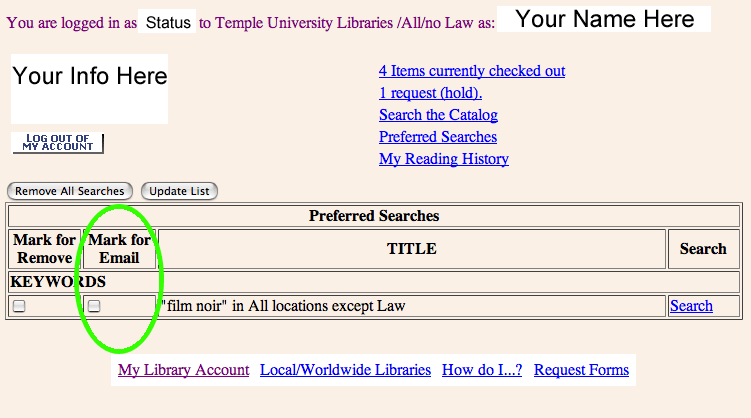
Saved Searches page in My Library Account area of catalog Follow the “Patron Record” button at the top back to the Library Account screen. Now when you click on “Saved Searches” you will see the saved search. Through this screen you can see the search again (link to the right), delete it, or “mark for email”. If you click off “mark for email” and then “update list” you will be set-up for email notifications. Periodically you will be sent an email with any new additions to your saved search(es), including author, title, call number, and subject(s), as well as a link into the library catalog record for the item. If you have any questions or need assistance contact Derik Badman.

–Derik A. Badman

Hamletworks

Since 1994, scholars at a number of universities have been working on an electronic variorum of Shakespeare’s Hamlet. What is a variorum? It collects both the play itself (including textual variants) and its attendant criticism, interpretations, and annotations as written by various authors through history. Usually variorums are in the form of books and thus limited in scope; this project is in the form of a web accessible database and theoretically unlimited in scope.

After 11 years the project still isn’t complete (and how could it be with people still writing on Hamlet to this day), but what is there shows the promise of what will come. Already one can see extensive commentaries on the play, often at the level of the single word. These comments are not yet linked to full bibliographic citations, though that is the eventual outcome. The site also includes electronic images of editions of the play and four searchable concordances.

This project is an excellent example of how technology can be used to assist literary study. This kind of narrowly focused but highly detailed project (narrow in its focus on one work, not narrow in its potential size) is made more easily possible and widely available thanks to computerized databases and electronic communication.

See a longer article at the Chronicle of Higher Education.

–Derik A. Badman

Diamond Search Bookmarklets

A bookmarklet is similar to any other “Favorite” or a “Bookmark” that you save in your internet browser. Similar, but also different. It is a very small program that takes input from the user and loads up a page based on that input.

Below are two bookmarklets that can search Diamond, our library catalog. Instead of having to navigate into the catalog and click on the search you want to do, the bookmarklet will search the catalog by keyword in one of two ways:

1) Highlight some text on your screen with your cursor. Then click on the bookmarklet. It will search the catalog for the words you highlighted and bring up a page of results.

2) Click on the bookmarklet. A box will pop-up prompting you to enter keywords. Type what you what to search for in the box and hit “OK”. You will then get a page of results in the catalog.

To use the bookmarklet you need to add it to your list of Favorites/Bookmarks. You can drag the link into your browser toolbar or right click and select “Add to Favorites/Bookmark this Link.” It works best if it is the group of bookmarks that appear in your toolbar.

For Internet Explorer Users:

Diamond Keyword Search

For Firefox users:

Diamond Keyword Search

–Derik A. Badman

EndNote and RefWorks: Differences and Similarities

Recently a number of patrons have asked about the differences and similarities between EndNote and RefWorks, two programs that help writers and researchers organize their references.

Here are some differences between RefWorks and EndNote:

1) RefWorks is free because the university has a site license to the RefWorks web site. You just have to go to RefWorks to create an account. EndNote costs about $100 for students and about $180 for the exact same software at the regular price. But when you leave Temple, Endnote will still be on your computer, while your Refworks account will be inaccessible.

2) RefWorks is web-based so you can access your account from any computer with an Internet connection. If you are on a computer that does not have Internet access, you will not be able to get to RefWorks. EndNote in contrast is loaded onto the hard drive of your computer so it is not accessible from other computers. However, EndNote licenses do allow you to load a copy onto your “work” computer as well as one on your home computer. Check your license for details.

3) EndNote is probably faster because it resides on your computer. RefWorks will be slow if your Internet connection is slow.
Here are some similarities between RefWorks and EndNote:

1) Both EndNote and RefWorks are databases that allow you to organize the references you use for your research. You can enter references manually or download them.

2) For both, there are two ways to download records. You can start from an external library database, save selected records, and import them into EndNote or RefWorks. The second method is to use either EndNote or RefWorks’ native search interface to search external library databases. Downloading of records can be problematic with some library databases, so for questions on specific databases, get in touch with one of the contacts at the end of this entry.

3) You can output your references into the form of a bibliography in many different styles, including APA, MLA, Chicago Style, as well as hundreds more, including many for the sciences. For each program, you can take an output style and customize it for your own purposes, or you can create a new style from scratch.

4) Each program has an MS Word plugin that allows you to insert in-text citations as you write your paper while your bibliography is automatically constructed at the end of the paper. EndNote’s plugin is called Cite-While-You-Write, while RefWorks’ is called Cite-N-Write.

5) You can transfer records between EndNote and RefWorks, so if you start by using one of these programs, you can switch at a later date to the other one.
So, which one to select? One of my colleagues called RefWorks “clunky” compared to EndNote. Another colleague said that she could use RefWorks after 1.5 hours of training and still had trouble with EndNote after 9 hours of training. She says that RefWorks is much more intuitive. I like EndNote but have spent a long time learning it. I’ve also used RefWorks recently and found it very useful.

The only surefire advice is that if you don’t have EndNote already, start with RefWorks and see how you like it. But above all, if you are doing a lot of research writing, try one of these products out because it could save you a whole lot of time.

For more information, email Fred Rowland or George Fowler.

–Fred Rowland