Crafting Space for Student Belonging Part II: Using Canvas to Promote Belonging in Undergraduate Courses

By Jonah Chambers and Elizabeth White Vidarte

Imagine it’s your first visit to Philadelphia where you are meeting an important client for a new job. The only address you’ve been given is “The Rocky statue on the Parkway,” so after pulling off I-676, you struggle to figure out where to go once you’ve exited onto The Ben Franklin Parkway. Eventually, you ask a kind stranger who suggests you try navigating to the Philadelphia Art Museum, but following “Art Museum Drive” takes you to a tiny parking lot overlooking the Schuylkill river (a river,  you’ve since discovered with some light embarrassment, that is not pronounced the “Shoo-lee-kill”). You’re clearly at the Art Museum — a large banner proclaims, “Art Splash,” and the pillars and entryway seem familiar from Google Images — but you’re no closer to finding the boxer of 80s legend or your new client. You start to worry, with a vague sense of gloom, that this new job may not be in the cards for you. 

As silly as this scenario may be, it’s not entirely unlike what a brand new college student may feel, to greater or lesser extremes. Walking into a classroom, most students know from twelve-plus years of experience where to sit, who to talk to, and where the professor will likely be standing. But everything else about college may be utterly bewildering (not to mention an online course!). So how do we get our students to feel capable, excited, and welcomed in our learning spaces — instead of lost, confused, and checked-out? 

We know from the research (Strayhorn 2018) that belonging matters a great deal when it comes to student engagement and success. By intentionally structuring your Canvas course, you can promote clarity, inclusivity, and motivation—all of which contribute to students feeling they belong. Here are some practical strategies to help you use Canvas effectively to support belonging in your courses.

1. Design for Clarity and Accessibility

A well-organized course structure makes it easier for students to navigate your content and understand expectations. This reduces anxiety and sets the stage for deeper engagement.

  • Organize content and activities into Modules: In Canvas, Modules are more than just the primary way to organize course content into structured units: they contribute to a sense of belonging for students by providing a clear path through the material, promoting consistency, and creating a feeling of being part of a cohesive learning journey.
  • Organize your modules in a linear progression: As Michelle Miller emphasizes in Minds Online, “Structure is the enemy of procrastination” (2014, p. 214). Arrange your modules chronologically, such as by week or topic, and ensure each includes all required content, activities, and assignments with clear due dates.
  • Provide a Tour of Your Course: A short video tour of your Canvas course can familiarize students with the layout, assignments, deadlines, and resources. This simple step reduces confusion and helps students navigate your course effectively.
  • Provide clear instructions: Break down tasks into manageable steps and use descriptive headings so students can easily find what they need.
  • Ensure accessibility: Use Canvas’s accessibility checker to ensure your course materials are usable by all students, including those with disabilities. Consider font size, color contrast, and the use of alt text for images.

2. Personalize Your Presence

Students feel more connected when they see their instructor as an approachable, real person. Canvas offers several tools to help you build rapport:

  • Welcome video: Kick off the course with a short video introducing yourself, your teaching philosophy, and what excites you about the course. Videos you record in Panopto will automatically generate captions and can be easily embedded in Canvas. The CAT’s Ready, Set, Panopto! self-enroll course lets you learn about Panopto at your own pace.
  • Announcements: Use announcements not only for logistics but to celebrate student achievements, offer encouragement, or share relevant opportunities and current events. You can even use the availability dates to pre-populate your course with timely announcements, such as a weekly announcement that students can expect to appear every Monday at 9am outlining how the content for this week builds upon that of last week’s.
  • Discussion board participation: Engage with students in Canvas Discussions by responding to their posts, posing follow-up questions, and connecting their ideas to course concepts or other students’ ideas. If the number of students in your sections makes this impossible, message a smaller number of students directly each week, offering thoughts and feedback on their contributions, ensuring every student receives at least one such message each semester. Consider writing a final post to the discussion bringing together common threads, highlighting points of divergence, and posing further questions that can be taken up in class.
  • Multimedia comments: Use Canvas’s built-in media recorders in SpeedGrader to provide feedback in audio or video form to add a personal touch. Captions are also now auto-generated for video comments in SpeedGrader.

3. Foster Peer-to-Peer Connections

Belonging doesn’t come just from student-instructor relationships; peer interactions matter too. Use Canvas to facilitate collaboration and community building.

  • Introduce icebreaker activities: In the first week, create a discussion prompt that allows students to share something about themselves—their academic interests, hobbies, or goals.
  • Leverage group work: Use Canvas Groups to facilitate collaborative projects or study groups. Assign roles to ensure everyone contributes and feels valued.
  • Create a Q&A board: Set up a forum where students can ask and answer questions, fostering a sense of shared responsibility and support.

4. Connect Course Content to Student Goals

Students are more likely to engage when they see how the material connects to their personal and professional aspirations. Canvas can help you make these connections explicit.

  • Preview learning outcomes: At the start of each module, include a brief overview of what students will learn and why it matters.
  • Reflect on relevance: Encourage students to reflect on how course topics relate to their experiences, interests, or career goals. Use discussion boards or short journal assignments for this purpose. Consider embedding a question that prompts reflection on relevance into quizzes and exams.
  • Alternate Content with Assessments & Activities: Layer content delivery with activities. After each new segment of content, provide opportunities for students to apply their knowledge through discussions, quizzes, or collaborative projects. This multimodal approach will deepen learning.

5. Support Student Progress

A supportive course structure keeps students on track and engaged.

  • Schedule a Clear, Reasonable, and Consistent Workload with Due Dates: Plan assignments and activities that align with the course’s credit hours, and provide sufficient time for students to complete their work. Set consistent deadlines—e.g., initial discussion posts due Tuesdays at 9 PM and replies due Fridays at 9 PM—to help students develop routines.
  • Guide Students Sequentially through Modules: When you want students to progress sequentially through Modules, consider using Requirements within the module to require students to complete one activity or task before moving on to the next. This will help keep students on track and scaffold their learning.
  • Check in with Your Students: Offer mid-course surveys to gather feedback and monitor student progress using Canvas Analytics. These tools allow you to track login frequency, page views, and assignment submissions. Early interventions, such as personalized emails, can help struggling students re-engage.
  • Offer multiple ways to engage: Provide content in various formats—videos, readings, and interactive elements—to appeal to different learning preferences.

By thoughtfully using Canvas to structure your course, personalize your presence, and build connections, you can create a learning environment where students feel they belong. Supporting students with clear structures, regular check-ins, and inclusive practices fosters motivation and success. Start with small changes, and watch how your students’ engagement grows!

References

Strayhorn, T.L. (2018). College Students’ Sense of Belonging: A Key to Educational Success for All Students (2nd ed.). Routledge. https://doi.org/10.4324/9781315297293


Elizabeth White Vidarte, Ph.D., is Online Learning Specialist at Temple University’s Center for the Advancement of Teaching.
Jonah Chambers, M.A., is Senior Educational Technology Specialist at Temple University’s Center for the Advancement of Teaching.
    •  

Annual Conference recap

by Jeff Rients and Emily Barber

On January 8th and 9th over 250 faculty members from Temple and surrounding schools gathered at the Howard Gittis Student Center for the 23rd Annual Faculty Conference on Teaching Excellence, hosted by the Center for the Advancement of Teaching and co-sponsored by Temple Libraries, Information Technology Services, the General Education Program and the Office of Digital Education.

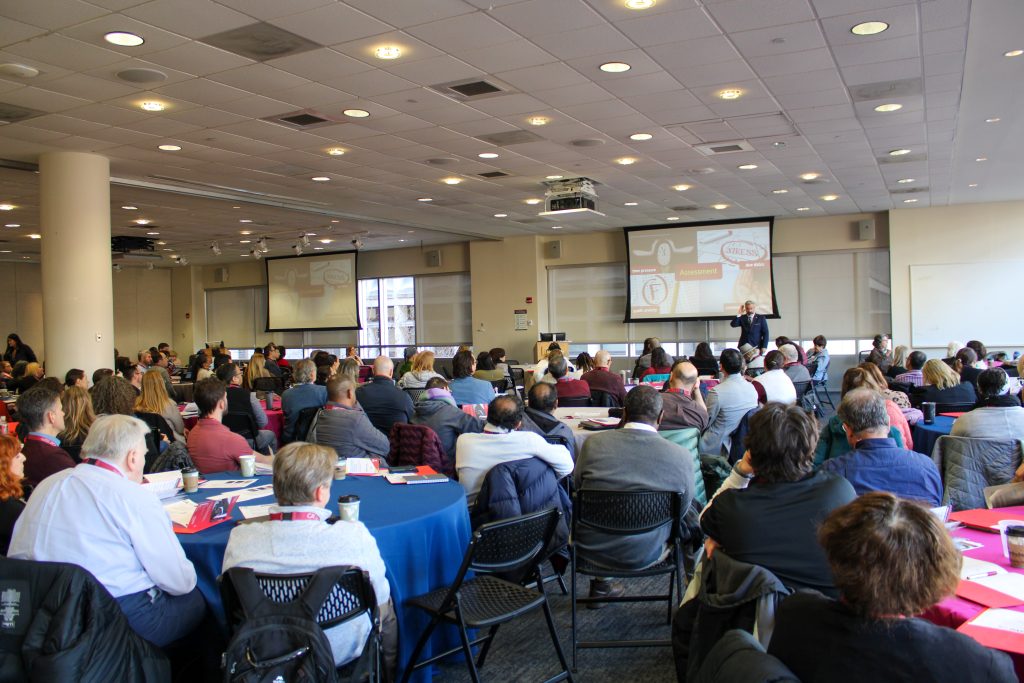
large conference room with tables filled with conference attendees and Tom Tobin at the front of the room

Our keynote address was provided by Dr. Thomas J. Tobin, one of the founders of the University of Wisconsin-Madison Center for Teaching, Learning, and Mentoring, and an internationally recognized scholar, author, and speaker on technology-mediated education. Dr. Tobin’s presentation was “Three Fabulous Design and Teaching Ideas that Take Work off Your Plate” and focused on issues of access to materials, assessment plans, and engagement strategies.

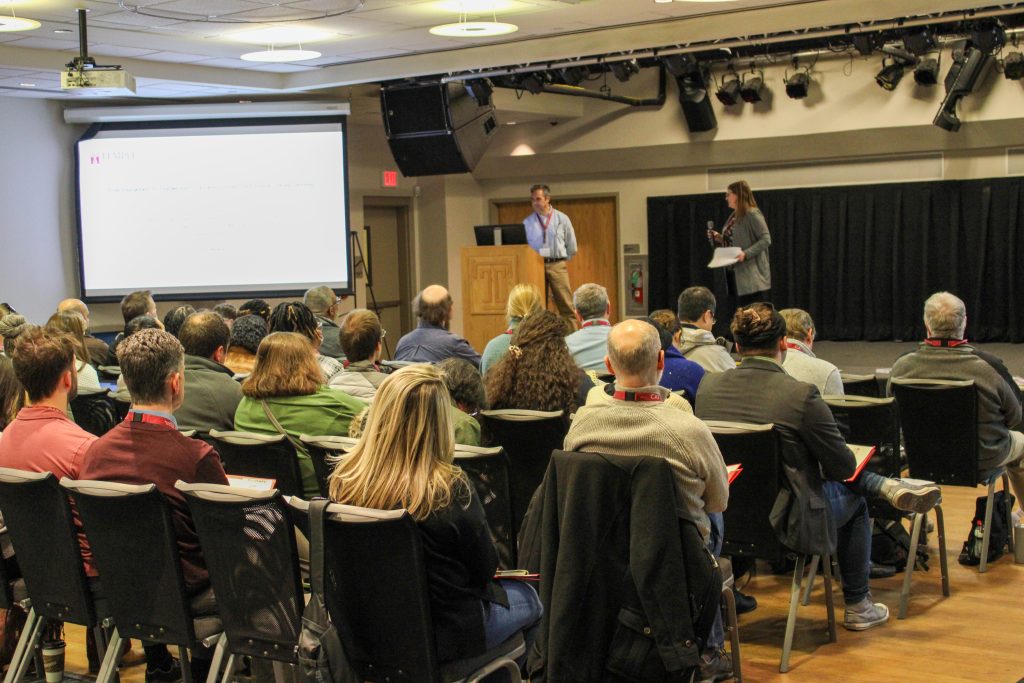
workshop attendees watching stage with 2 presenters

One of the Wednesday workshop sessions was “From Engagement to Empowerment: Designing Courses That Inspire Lifelong Learning”, facilitated by Rebecca Petre Sullivan and Victor Rizzo from the Lewis Katz School of Medicine.

multiple people discussing poster

Here Kristina DeVoe from University Libraries and Laura Zaylea from Media Studies and Production discuss their poster, Faculty-Librarian Collaboration in Designing Student-Centric Assignments. Kristina and Laura went on to receive the second place award in the poster competition, as voted by the conference attendees. Jessica Babcock in Math took third place with her poster, Did the Pandemic Change the Way We Teach? Yes- but not for the reasons you might think! and the overall winner was Rebecca Rivard from Villanova University with Creating of Digital Escape Games in Powerpoint.

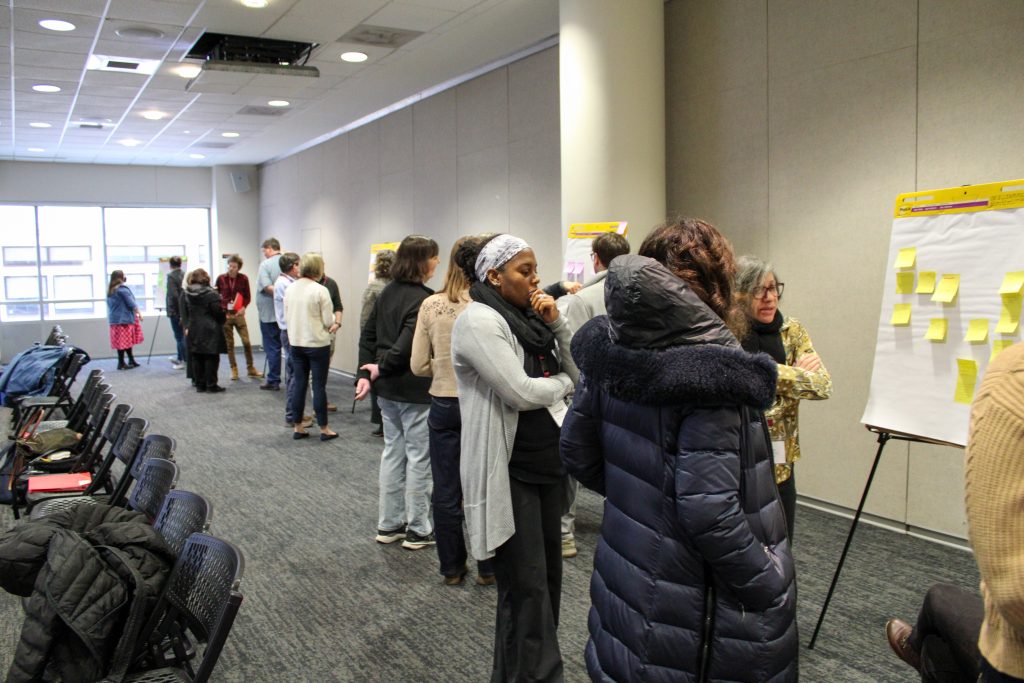
people discussing stickie notes on large sticky pads set up throughout the room

Jingwei Wu from the Department of Epidemiology and Biostatistics led a hands-on workshop titled “Beyond the Lecture: Techniques for Energizing Student Engagement through Thoughtful Interactions in the Classroom”.

President Fry addressing the conference room with microphone

Day two of the conference began with John Fry, Temple’s new President, offering some kind and encouraging remarks for faculty. Thank you, President Fry!

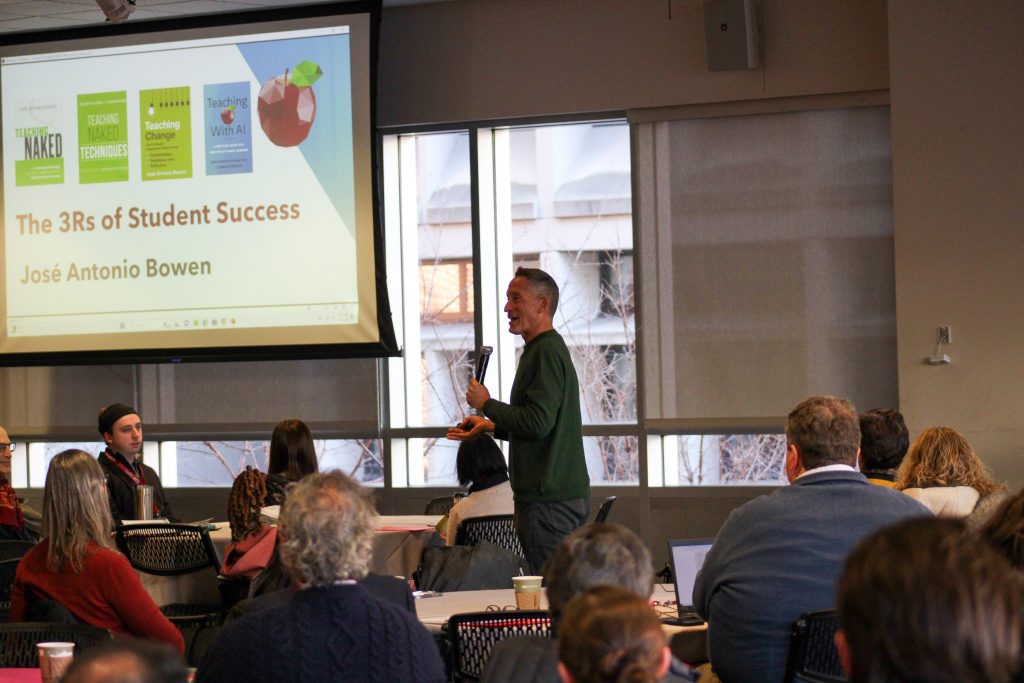
Jose Bowen presenting to filled room with attendees and tables

The plenary session was led by Dr. José Antonio Bowen, one of the real superstars of teaching and learning in higher education. Dr. Bowen’s presentation was called “Teaching Change with a New 3Rs” and focused on the role of relationships, resilience, and reflection in the classroom.

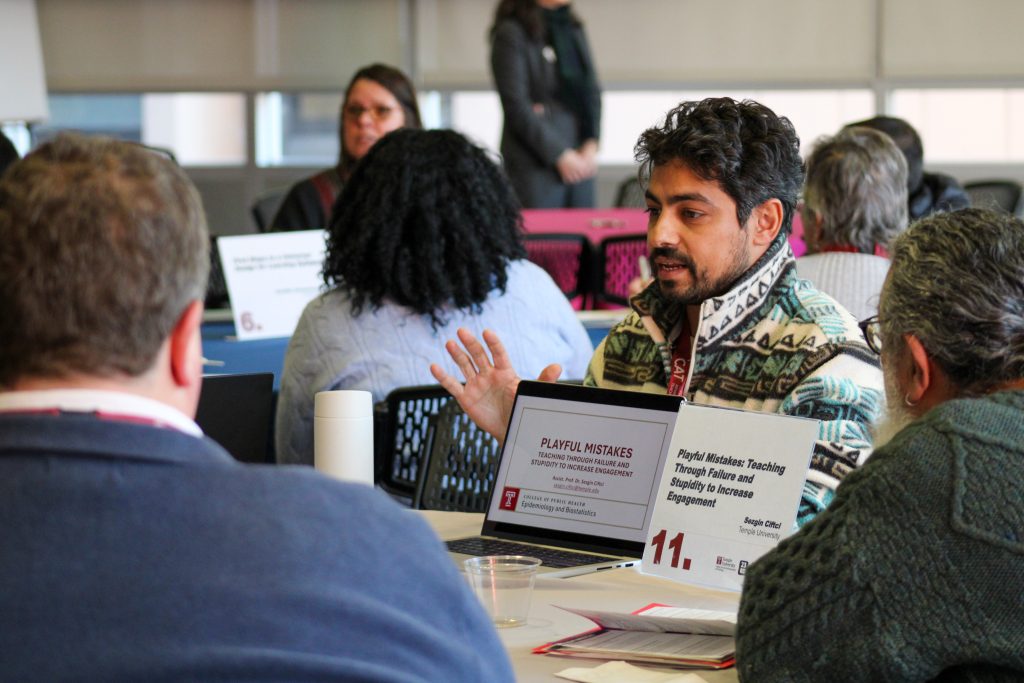
Man presenting with laptop at small table for lightning talk 11

The final event of the conference was the Lightning Talks session. Here Sezgin Ciftci from the College of Public Health quickly explains his intriguing concept “Playful Mistakes: Teaching Through Failure and Stupidity to Increase Engagement.”

We want to thank the many, many people who contributed to the success of the conference: the keynote and plenary speakers, the co-sponsors, the workshop and breakout session facilitators, the poster exhibitors, the lightning round presenters, the Student Center event staff, the caterers, and the CAT staff. And a special thank you to all the faculty who took 2 days out of their busy schedules to sharpen their pedagogical skills and thinking before the start of the semester. We hope to see you again next year!

And if you’ve never been to our Annual Faculty Conference on Teaching Excellence, please consider joining us in 2026. Temple faculty can register for free!


Jeff Rients is Associate Director of Teaching and Learning at Temple University’s Center for the Advancement of Teaching.

Emily Barber is Graphic and Digital Design Coordinator at Temple’s Center for the Advancement of Teaching.
Crafting Space for Student Belonging, a CAT Series, Part I: Designing Courses to Promote Belonging

by Stephanie Laggini Fiore, Ph.D

Anyone who has spent time with me has heard me say that I’m bionic. I had my knees replaced in 2018 and now have titanium in my body that sets off alarms at the airport. I’ll take it! The TSA can pat me down anytime they want if it means I can live without the chronic pain I experienced for decades. During that painful time, especially in the latter stages of my condition when climbing stairs was particularly difficult, curb cuts in sidewalks were a lifesaver. As was intended when they were created post-WWII to provide a more accessible environment for people with disabilities, curb cuts allowed me to maintain mobility, making it easier to cross streets while walking around town. But here’s the thing: I still use curb cuts and I’ll bet you do too. As Angela Glover Blackwell explains: “Then a magnificent and unexpected thing happened. When the wall of exclusion came down, everybody benefited—not only people in wheelchairs. Parents pushing strollers headed straight for curb cuts. So did workers pushing heavy carts, business travelers wheeling luggage, even runners and skateboarders.” Blackwell is describing universal design, which allows better access to people with a range of abilities and needs. Similarly, Universal Design for Learning (UDL) is an educational framework that provides better access to learning for people with a wide variety of abilities and needs. For 40 years, CAST has been working to educate faculty on the power of UDL to create more inclusive learning environments, ones where courses are designed to value every learner, thereby catalyzing student belonging. 

Why is belonging important? Studies report a variety of benefits that a sense of belonging provides for students, including academic engagement and motivation, academic achievement, retention, and positive effects on well-being, among others. Our pedagogical practices play a very real role in improving student belonging, which is why we have created Crafting Space for Student Belonging: A CAT Series. We have chosen UDL to begin this series because belonging starts with course design. By eschewing a one-size-fits-all approach and instead following UDL principles in designing your course, you will lower barriers to learning, allow students to have greater agency in their learning, and increase students’ sense of belonging. 

The UDL 3.0 guidelines encourage us to design our courses by considering how we can provide multiple means of engagement, representation and action & expression. Much as with UDL in the built environment, a UDL-designed course will provide support to students with a range of abilities and needs. For instance, many consider captions of video content to be a necessity for students with hearing impairments. But other students may use captions to move through a video more quickly or slow down, repeat, and listen again. And some may use captions because they are watching the video in a space that is not private, where they cannot turn on the sound. I’m guessing you’ve used captions when you watch TV for greater clarity of dialogue. (For me, the Scottish English in Shetland is hard to decipher, but I love that show – so captions it is!) Here are a few ideas for beginning to design a course according to UDL principles: 

Multiple Means of Engagement— the “why” of learning

Welcoming Interests & Identities:

  • Allow choice and autonomy wherever possible. Let students choose a research topic that connects with their interests or permit them to choose the mode of delivery that is most motivating for them.
  • Incorporate storytelling that allows students’ creativity and lived experiences to connect to content in the class.

Sustaining Effort & Persistence

  • Intentionally embed activities in your class that help students to connect with each other and form mutually-supportive networks.
  • Provide specific feedback that both recognizes the positive aspects of a student’s work and areas that need improvement. 
  • Message your belief that they can reach standards set for the course.

Emotional Capacity

  • Allow space for individual and group activities that encourage reflection.
  • Elevate the assets students bring to the class.
  • Develop classroom agreements on appropriate interactions in the classroom.

Multiple Means of Representation—the “what” of learning

Perception

  • Ensure that the materials for your course follow accessibility standards.
  • Review the materials and examples you use in your course to provide a more diverse representation of identities in them.

Language & Symbols

  • Use a variety of media beyond text for student access to content.
  • Clarify unfamiliar terms, vocabulary or references. Don’t assume that everyone in the class has the same background.

Building Knowledge

  • Have students use concept mapping to visualize connections among ideas in the course.
  • Point out key concepts in your course, or have students reflect on the key concepts they believe they have learned and provide feedback.

Multiple Means of Action and Expression—the “how” of learning

Interaction

  • Use the accessibility checker in Canvas to ensure that your course materials are accessible.
  • Design course requirements to allow for flexibility, wherever possible.

Expression & Communication

  • Scaffold major assignments, gradually releasing scaffolds as skill develops.
  • Allow students to use a variety of media in order to demonstrate what they have learned.

Strategy Development

  • Clarify course and assignment goals. 
  • Provide opportunities for students to reflect on their progress and learning.

If you click through the UDL 3.0 Guidelines, you will find so many more ideas. It can feel a bit overwhelming! So here’s an approach I recommend. Review the guidelines and conduct a self-assessment of your teaching practices. Where are you already enacting some of these principles? Where might you want to improve your practices? Then commit to one way in which you will improve your course design using UDL principles. Once you have successfully implemented that change, choose another, and so on. Incremental change is fine – the important thing is to get started! 

Remember that we at the CAT are here for you if you need assistance in how to implement practices that improve belonging.  

Coming up next in the Crafting Space for Student Belonging series:

This spring series on belonging will provide blogs and videos that describe practical ways for you to enact practices that lead to student belonging. Here’s what coming up this month:

  • January 21, 2025: CAT Tip video: Introducing the new UDL Guidelines
  • January 27, 2025: EdVice Exchange: Canvas design that encourages belonging
  • February 4, 2025: CAT Tip video: Using modules to organize your content in Canvas
 
Stephanie Laggini Fiore, Ph.D., is Associate Vice Provost and Senior Direct of Temple University’s Center for the Advancement of Teaching.

Post-Election Resources for Faculty

As human beings, ongoing global and national events—such as elections, wars, and political conflict—can significantly impact our emotions. Even if you do not teach a course directly related to current events, you may find that your students are discussing these issues with each other and want you to acknowledge what is happening and its impact on them and their communities. Whatever the outcome of this election, it will be on everyone’s minds, so preparing ourselves and our students for any moments of conflict and emotional intensity that may arise is helpful. 

The CAT has created a collection of election resources to assist you in planning for election day and the days following. Also available to you is the CAT Tip Video Series, Teaching in Tumultuous Times, which was created to provide concrete steps and strategies for preparing ourselves and our students for challenging conversations and hot moments. These include:

Begin the semester by setting the tone for your classroom. Dana walks you through some suggestions for doing just this.

Linda offers suggestions to help us think about how we might prepare ourselves for challenging conversations in the classroom by using the Hopes, Fears and Agreements activity to build community and set guidelines for interactions within our courses.

Knowing your triggers and what to do about them is important and so is building a community of support for yourself. Jeff outlines what happens when we feel triggered and some things you might consider doing to work learn to recognize and handle those triggers.

Elizabeth summarizes and represents three ways one might slow things down when a conversation begins to get heated.

We all know that hot moments can happen in the classroom. In this video, Stephanie offers some tips for how to manage them and how to get your class back on track.

While we recommend taking a little time to review the resources above, we’ve also created a quick-start guide to managing hot moments: The Five Rs: Remind, Reflect, Regroup, Recess, Refer. Please take a moment to review these ideas. A few moments of preparation can make a difference in your class. As part of that preparation, make sure to have the Dean of Students Post-Election Resources webpage handy to provide resources to students who may need them.

Remember too that self-care is important at this time. We encourage you to find a community of people you can go to for support and perspective, as these events can impact your own well-being. The CAT will be hosting Drop-In Water Cooler sessions to provide space for open discussion and community with CAT consultants and your colleagues on the following dates (no registration required):

  • Thursday, November 7: 11:00-12:30 (Zoom
  • Friday, November 8 12:30-1:30 (TECH 107)
  • Monday, November 11: 11:00am-1:00pm (TECH 107)

As always, we invite you to connect with us at the CAT, where we are here to support you in person and online through 1-1 consults, open lab hours, and workshops.

As always, we invite you to connect with us at the the CAT, where we are here to support you in person and online through 1-1 consults, open lab hours, and workshops.

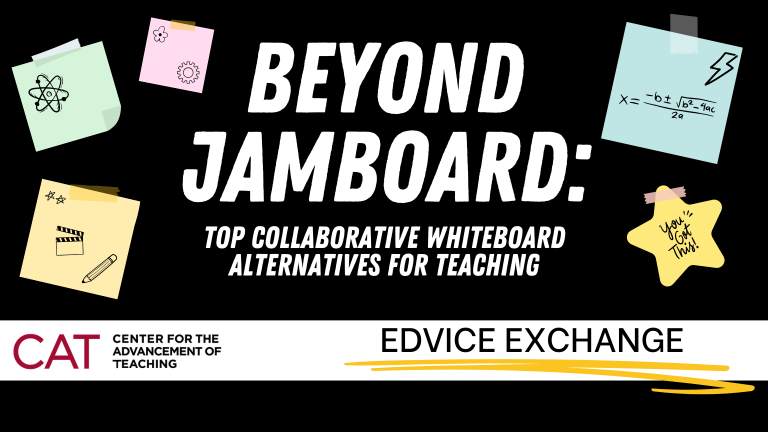
Beyond Jamboard: Top Collaborative Whiteboard Alternatives for Teaching

By Jonah Chambers

Whether you’re a current Jamboard user or looking to integrate new tools into your teaching, collaborative online whiteboards offer students a shared virtual space for brainstorming ideas, visualizing concepts, and engaging in group work. As Google plans to retire its popular Jamboard service on December 31, 2024, here are some excellent replacement whiteboarding tools to consider.

Zoom Whiteboard

For a Temple-supported option, Zoom Whiteboard stands out as an excellent choice. Although it can be used within Zoom meetings, Whiteboard can also be created and shared outside of meetings for use during in-person classes or for students to do work asynchronously. 

Zoom Whiteboard mirrors many essential features of Jamboard, such as posting digital Post-It notes for brainstorming and gathering quick feedback. Participants can also comment on each other’s posts and draw connecting lines between elements, which is ideal for diagramming and visualizing complex concepts. For group work, educators can create multiple pages, providing dedicated workspaces for each team. Another significant advantage of Zoom Whiteboard is the ability for creators to lock their content, preventing accidental deletions—an enhancement over Jamboard’s limitations.

If you’re interested in having your students use AI, Zoom has integrated its AI Companion tools directly into Whiteboard, allowing educators and students to generate content as a jumping-off point for further engagement or discussion. Its combination of features makes Zoom Whiteboard a robust tool for fostering engagement and creativity whether you are teaching in person, online, or asynchronously.

Miro

For educators seeking a more feature-rich experience, Miro presents a compelling alternative. While Temple does not provide support or licenses for this platform, educators can apply for a free Education Plan. Miro offers a wide array of functionalities, including the ability to post digital sticky notes, draw connections, mind map, embed images and videos, and create detailed diagrams, flowcharts, and wireframes.

One standout feature of Miro is its Frames tool, allowing users to organize boards into sections designated for different groups or different activities such as voting or brainstorming. The Presentation mode provides a structured approach for reviewing the fruits of group work or the outcomes of an activity with the entire class at the conclusion of a session.

Miro makes collaboration easy since students do not need individual accounts to participate. Educators can simply generate a link that allows anyone to interact with the board, similar to Google’s sharing features. For those who have previously used Jamboard, Miro also allows for the importation of existing Jamboard projects, ensuring that valuable work is preserved.

Padlet

Unlike the free-form environments of Jamboard, Zoom Whiteboard, or Miro, which can sometimes feel overwhelming due to their open layout, Padlet offers preset board layouts to help you effectively organize student contributions. For example, during a class debate where you ask students to offer supporting evidence or reasoning on a position, you can create distinct columns on the board for each position and ask students to contribute their ideas (using post it notes, audio, video, images and documents) in clearly defined sections. This structured method makes Padlet particularly valuable for facilitated discussions and activities that involve categorization.

While Temple does not support or hold a license with Padlet, free accounts enable users to create up to three Padlets. Once you’ve completed an activity, you can easily export these Padlets as images, allowing you to clear the board and recycle it for future classes or activities.

While the retirement of Jamboard is disappointing, we’re excited to share these alternatives that, in many cases, provide even more robust features and functionality. If you’d like to dive deeper into any of these tools or discuss how to integrate whiteboarding solutions into your teaching, feel free to schedule a one-on-one consultation or stop by one of our EdTech Labs.


Jonah Chambers works at Temple University’s Center for the Advancement of Teaching as Senior Educational Technology Specialist.

Set for the Semester: Essential CAT Resources for Fall Teaching

As you ready yourself and your courses for the start of the fall semester, we offer this resource round-up to help get you rolling.

Preparing Your Syllabus

The Fall 2024 Syllabus Guidance has been posted and includes sections on generative AI and the recording and distribution of recordings of class sessions. 

Using Canvas

Drop into one of our upcoming workshops on teaching with Canvas. If you’re new to Canvas, take our self-paced Ready, Set, Canvas course to get you up to speed. 

Getting Ready for the Election

Plan ahead by creating discussion guidelines and preparing for hot moments in the classroom with our Election Resource Guide.

Teaching and Learning with Generative A.I.

Visit our Faculty Guide to AI webpage.

This EDvice Exchange blog post rounds up past posts on teaching and generative AI. Sample syllabus statements outlining ideas for your policy on generative AI can be found here

CAT Services

The Center for the Advancement of Teaching (CAT) offers an array of services and resources that are tailored to your teaching. Whether you teach in person or online, undergraduate or graduate students, small classes or large lectures, we are here to support your instructional needs. As you begin the 2024-2025 academic year, know that the CAT is here to help.

CAT Technology Labs and Workspaces

Visit us at the following locations for:

  • Drop-in expert assistance with your teaching and educational technology questions (no appointment necessary)
  • Quiet workspaces
  • Access to computers, scanners, and printers
  • Comfortable lounge area with complimentary coffee for informal discussions with colleagues

Main Campus CAT: TECH Center (Bell Building), Suite 112

Hours: Monday through Friday, 8:30am-5:00pm

Health Sciences Campus CAT: Student Faculty Center, Room 200

Hours: Monday through Friday: 8:30am-5:00pm 

Ambler Campus CAT: Ambler Learning Center, Room 301

Hours: Monday through Thursday: 8:30am-10:00pm; Friday: 8:30am-5:00pm

Note: This self-service lab and workspace is for faculty use only. No CAT consultants are on site.

Virtual Drop-in EdTech Lab: available online via Zoom. The virtual lab is staffed by our Educational Technology Specialists during our regular business hours. Visit our Educational Technology Labs and Workspaces page for access. 

Hours: Monday through Friday, 8:30am-5:00pm.

For more information about our locations, see our website

Room Reservations

The CAT offers meeting spaces for faculty and staff at our Main Campus location. Visit CATbooking to reserve time in one of the following spaces:

  • Room 107: Breakout Room (Capacity: 12)
  • Room 110A: Collaboration Room (Capacity: 5)
  • Room 112G: Consult Room (Capacity: 2)

One-on-One Consultation Appointments

If you would like uninterrupted, dedicated time with a CAT pedagogy or educational technology specialist, please visit CATbooking to schedule a one-hour in-person or virtual consultation. When making an appointment with a consultant, you will have the option to choose an in-person meeting at the Main Campus CAT or Health Sciences Campus CAT, or a virtual (Zoom) meeting. Within the locations, appointment times are categorized by consultation topics offered at the CAT. If the hours available in the booking system are not feasible for you, please email cat@temple.edu to arrange an alternate time. 

Teaching Observations

Whether you are implementing a new teaching strategy, trying to solve a teaching challenge, or simply would like to check in with a colleague in order to reflect on your teaching, the CAT offers a variety of services. 

  • Classroom Observations: Set up an observation of your in-person or virtual class
  • Mid-semester Instructional Diagnosis: A CAT specialist visits your class to gain student consensus on their learning experience, and deliver that feedback to you 
  • Course Design: Work with a pedagogy specialist to design a course using evidence-based principles for delivering significant learning opportunities to your students.
  • Curriculum Mapping and Program Assessment: Get assistance designing and assessing a programmatic curriculum that will provide a pathway for student achievement of your program’s goals. 

Please visit our Consultations and Observations web page for more information.

Get in touch with us!

We’re here to help! If you need anything as you begin your semester, please email us at cat@temple.edu or call our main campus office at 215-204-8761.

Get Ready for Fall! A Course Design Round-Up

By Jeff Rients

Can you believe it is August again?!? If you are anything like me, then you already feel behind in prepping for the fall semester. But the CAT is here to help! We’ve got a wide variety of resources to help you start the new semester off right. 

If you are building a new course or substantially revising one, our Course Design blog series may be of assistance. Design Your Course for Significant Learning! provides a big picture overview of the design process, while Context Matters: Considering Situational Factors in Course Design can help you think about the specific challenges and key details in your course. (The big situational factor we’re all facing right now is generative artificial intelligence.) Our post Learning Goals: Dream Big! provides a framework for formulating learning goals that motivate students for success, while Aligning Assessments with Goals connects those goals with how you will assess and provide feedback. The post The Heart of the Course: Learning Activities! reviews the importance of providing students with the appropriate content and opportunities for practice before you assess them. And finally, Houston, We Have Liftoff! Successfully Implementing Your Course Design helps you put it all together.

Finally, if you want to do some thinking about alternative assessment plans, try our post A Brief Introduction to Ungrading.

You don’t have to design or redesign your course by yourself! You can make an appointment for a one-on-one consultation or visit any of our Ed Tech labs for drop-in assistance. Please join us for any of the many workshops the CAT is offering this fall. And if you need any other support in your mission teaching our wonderful Temple students, just let us know!

Navigating AI: Essential EDvice Exchange Reads for Fall

by Dana Dawson, Ph. D.

With the beginning of the fall semester steadily approaching, you may be pondering how you will address the use of generative AI in your courses. To help with your decision making, AI student guideline drafting as well as activity and assessment designing, we encourage you to take a look back at EDvice Exchange posts on the topic of planning for AI use in your classes. 

A Survival Guide to AI and Teaching

Our series “A Survival Guide To AI and Teaching” featured posts on everything from what generative AI is to the ways these tools will impact equity in education. 

Faculty Adventures in the AI Learning Frontier

Our spring 2024 series “Faculty Adventures in the AI Learning Frontier” showcased how Temple faculty members used and talked about AI in their classrooms during the previous semester.

In the final post in the series, Michael Schirmer, who teaches in the Fox School of Business, shared his experiences with generative AI both with his students and as part of his personal scholarly practice.

Using PI to Manage AI

Our series “Using PI to Manage AI” considered the most fundamental element of addressing AI in our courses: sound pedagogy. Posts in this series focused on evidence-based ways of designing assessments of student learning that encourage academic honesty, motivation, and a desire to learn.

CAT Tips Season 5 – Generative AI Tools

Finally, our most recent series of CAT Tips, short videos offering teaching tips and suggestions, focused on how generative A.I. tools can be used to support student learning.

CAT staff are available for consultation throughout the summer. To schedule an appointment, visit our consultation booking page. The CAT’s Ed Tech labs are also open Monday through Friday, 8:30-5 if you’d like to drop in and chat with a staff person about AI tools (or any other educational technology question). 

Our Faculty Guide to A.I. webpage features helpful information and resources, including information on Temple’s policy. 

We also welcome you to sign up for one of our pre-semester AI workshops.

AI or Nay? Deciding the Role of Generative AI in Your Classroom

Thursday, August 8, 2024, 11:00AM-12:00PM via Zoom

Register for this workshop

Generative AI tools to help with research, writing, ideation and creative work are now part of our educational landscape and cannot be ignored, but you may be feeling unsure how to address them in your classes. Should you encourage their use but place parameters on how they are used? Will allowing students to use AI tools reduce the efficacy of your classes? Or is AI use now an essential skill for our students? In this workshop, we will explore the implications of allowing students to use generative AI tools and help you work through the question of whether and how you will permit their use in your classes.

AI Assignment Re-Do Bootcamp

Register for this workshop

Monday, August 12, 2024 and Wednesday, August 14, 2024, 1:00PM-4:00PM, Tech 109

We have been learning more about generative AI tools such as ChatGPT and what it means to teach in a world where generative AI is available to us and our students. In this 2-day intensive workshop, faculty will collaborate to revise and/or develop assignments for the AI era. You will learn how to intentionally leverage AI tools for learning and development as well as how to modify assignments to make them more AI resistant. You will also learn a framework for discussing the assignment and the role of AI in your classroom with students. This is an opportunity for you to develop the best assignments you’ve ever used in your classroom. Bring an assignment you already use and stride boldly into the future with us!

AI Sandbox

Register for this workshop

Wednesday, August 14, 2024, 12:00PM-1:00PM, Tech 109

Have you been putting off familiarizing yourself with AI tools? Or have you tried some of the more commonly available apps but would like to learn more about the wide variety of tools that are available? Join us for a hands-on exploration of the AI tools that are changing the way we live, work and study.

Mindful Management of AI During Finals

by Dana Dawson

As we near the end of the semester, it’s important to carefully consider your plan of action should you suspect students have used generative AI in a manner that you explicitly prohibited. In past blog posts, we strongly encouraged faculty members to begin by meeting with the student in cases where you suspect unacceptable use of AI and to start with a conversation. However, in the case of final exams and projects, you may feel you don’t have time for that course of action. In this post, we offer some suggestions for how to prepare for and address AI use during the finals period.

Ensure Guidelines Are Clear

Review your final exams and final project instructions to determine whether you have clearly outlined where the use of generative AI is and is not allowed. Build guidelines into assignments as well as the syllabus to ensure students have it readily available. Have a conversation with your classes to ensure they understand the limitations of acceptable generative AI use and state the steps that will be taken if you suspect students have used generative AI (more on that below). 

Test Your Final Exams and Final Projects Using Generative AI

Run final exam questions or final project prompts through tools such as ChatGPT and Claude.AI and prompt the tools to take the exam or complete the project. Note that in ChatGPT, you can simply copy and paste the entire exam or project prompt and rubric into the tool and ask it to generate a response. Claude.AI allows you to upload a pdf and enter a prompt. If you find that the tools can successfully complete your exams or assignments, reconsider the questions and prompts. Can you link questions or project prompts to in-class work that will draw on students’ past experiences? Can you add reflective or metacognitive questions that are difficult to replicate using generative AI? See this EDvice Exchange blog post for assessment ideas that are less prone to AI use.

Be Wary of AI Detectors

It has been well-established that AI detectors are not reliably able to differentiate between human- and AI-written text. Assessments we conducted of Turnitin’s AI detector, and four other applications available for free online, show that these detectors are prone to false positives (identifying human-written text as generated by AI) and false negatives (identifying AI-written text as generated by humans). AI detectors should never be used as the sole basis for a judgment on whether a student has used AI; companies such as Turnitin acknowledge this, for example, saying in their own explanatory materials that detector predictions should be taken with a grain of salt and that the instructor must ultimately make their own interpretations. Notably, TurnItIn also indicates that a score of 20% or less AI-created should not be considered valid. As you assess AI detector reports, keep in mind that there are currently no completely reliable detectors of generative AI use in writing available to instructors.

Step on the Brakes

Confronting possible cheating is always stress-inducing. We see a block of text or a pattern of answers that seem unlikely to have been generated by a student and the stress response kicks in. This is not the optimal time to make a decision. Take a breath, step away. Consider factors that might be influencing your assessment of the student’s work or your willingness to accept the results of an AI detector. Talk to a colleague or a CAT consultant and carefully consider all factors before making a determination as to your course of action.

You Can Still Have a Conversation with Students

If you strongly suspect a student of using generative AI in a manner you have stated is not acceptable, ask the student to meet, by Zoom if they are already off campus. If they are not able to meet prior to the end of the grading period, issue an Incomplete for the course and do not grade the final exam or project until you have met with the student. 

Have a Back-Up Plan

If you speak with the student and they do not admit to using generative AI, have an actionable plan for how to proceed. Consider how you might replicate the element you suspect they used AI to complete. Can you conduct an oral exam? Can they write an essay or a reflective statement on their process of solving the exam question or completing the project in-person? To talk over your plan for considering possible AI use in these final weeks of the semester, don’t hesitate to reach out to schedule a consultation with a CAT specialist. 

Err On the Side of Caution

The suspicion that a student may be taking shortcuts can be upsetting and we are all struggling to manage course design and delivery in the age of AI but the risk of falsely accusing a student should be taken very seriously. A false accusation can derail a student’s entire educational trajectory and not only because of the possible impact on their GPA; more importantly, it can shake their trust in their faculty members, their experience with higher education and their motivation to continue, particularly where their sense of belonging is tenuous. Turnitin has acknowledged that their detector is more likely to generate a false positive in the case of English language learners or developing writers as some of the writing patterns more common among these populations are the same patterns AI detectors look for in identifying AI-generated text. We must exercise the utmost caution in accusing any student and be sure to give them the benefit of the doubt when engaging in these conversations. 

Plan for Next Semester

Finally, once finals are over and your grades are in, make an appointment with a CAT specialist to explore how to revise assignments that are particularly vulnerable to AI use. We can often avoid these problems in the future by revising our current assessments into ones that work better in the age of AI.

2024 STEM Educators’ Lecture Recap

By Cliff Rouder, Ph.D.

The CAT’s STEM Educators’ Lecture, held on April 10, 2024, featured guest speakers Dr. Tara Nkrumah and Cornelio “Coky” Aguilera. Dr. Nkrumah is an Assistant Professor in the Department of Teacher Preparation, Mary Lou Fulton Teachers College at Arizona State University. Her research is on equitable teaching practices for anti-oppressive discourse in education and science, technology, engineering, and mathematics (STEM). Coky Aguilera studied as an Acting Specialist at UW Madison, works professionally with Tampa-area theater companies, and along with Dr. Nkrumah and colleagues have brought the Theatre of the Oppressed to different universities to engage academic audiences in critical investigations of inequities. Check out this Youtube video to learn more about the historical roots of Theatre of the Oppressed.

We were delighted to have their colleagues Dr. Vonzell Agosto, Dr. Deirdre Cobb-Roberts, and doctoral candidate Maria Migueliz Valcarlos join as they engaged Temple STEM and theater faculty in an interactive and engaging session titled, Unmasking the “Isms” in STEM Education to Promote Equitable Teaching and Learning. The speakers began by introducing a framework for the session–Iris Marion Young’s Five Faces of Oppression. They used this framework to help us think about how “isms” such as racism, ableism or genderism can manifest through the five faces of oppression, which are 

  • Exploitation
  • Marginalization
  • Powerlessness
  • Cultural Imperialism
  • Violence
  • For a more in-depth look at this framework, see Young’s “Five Faces of Oppression” in Geographic Thought: A Praxis Perspective.

As participants worked through definitions of these facets of oppression and shared examples of how they can manifest in our disciplines, departments, and classrooms, the speakers then engaged participants in a series of theater-based exercises that encouraged them to use mimicry and the creation of human tableaus to explore and address physical and emotional aspects of oppression.

For more on Dr. Nkrumah’s research, check out these recent publications:

  • Nkrumah, T. (2023). The Inequities Embedded in Measures of Engagement in Science Education for African American Learners from a Culturally Relevant Science Pedagogy Lens. Education Sciences, 13(7), 739.
  • Nkrumah, T., & Scott, K. A. (2022). Mentoring in STEM higher education: a synthesis of the literature to (re) present the excluded women of color. International Journal of STEM Education, 9(1), 1-23.
  • Nkrumah, T., & Mutegi, J. (2022). Exploring racial equity in the science education journal review process. Science Education, 1-15. https://doi.org/10.1002/sce.21719

As always, our CAT staff is ready to help you! To explore how to incorporate this work into your STEM courses or how to design and implement classroom-based research in this area, book a consultation appointment or email a CAT staff member directly.