Diamond Search Bookmarklets

A bookmarklet is similar to any other “Favorite” or a “Bookmark” that you save in your internet browser. Similar, but also different. It is a very small program that takes input from the user and loads up a page based on that input.

Below are two bookmarklets that can search Diamond, our library catalog. Instead of having to navigate into the catalog and click on the search you want to do, the bookmarklet will search the catalog by keyword in one of two ways:

1) Highlight some text on your screen with your cursor. Then click on the bookmarklet. It will search the catalog for the words you highlighted and bring up a page of results.

2) Click on the bookmarklet. A box will pop-up prompting you to enter keywords. Type what you what to search for in the box and hit “OK”. You will then get a page of results in the catalog.

To use the bookmarklet you need to add it to your list of Favorites/Bookmarks. You can drag the link into your browser toolbar or right click and select “Add to Favorites/Bookmark this Link.” It works best if it is the group of bookmarks that appear in your toolbar.

For Internet Explorer Users:

Diamond Keyword Search

For Firefox users:

Diamond Keyword Search

–Derik A. Badman

EndNote and RefWorks: Differences and Similarities

Recently a number of patrons have asked about the differences and similarities between EndNote and RefWorks, two programs that help writers and researchers organize their references.

Here are some differences between RefWorks and EndNote:

1) RefWorks is free because the university has a site license to the RefWorks web site. You just have to go to RefWorks to create an account. EndNote costs about $100 for students and about $180 for the exact same software at the regular price. But when you leave Temple, Endnote will still be on your computer, while your Refworks account will be inaccessible.

2) RefWorks is web-based so you can access your account from any computer with an Internet connection. If you are on a computer that does not have Internet access, you will not be able to get to RefWorks. EndNote in contrast is loaded onto the hard drive of your computer so it is not accessible from other computers. However, EndNote licenses do allow you to load a copy onto your “work” computer as well as one on your home computer. Check your license for details.

3) EndNote is probably faster because it resides on your computer. RefWorks will be slow if your Internet connection is slow.
Here are some similarities between RefWorks and EndNote:

1) Both EndNote and RefWorks are databases that allow you to organize the references you use for your research. You can enter references manually or download them.

2) For both, there are two ways to download records. You can start from an external library database, save selected records, and import them into EndNote or RefWorks. The second method is to use either EndNote or RefWorks’ native search interface to search external library databases. Downloading of records can be problematic with some library databases, so for questions on specific databases, get in touch with one of the contacts at the end of this entry.

3) You can output your references into the form of a bibliography in many different styles, including APA, MLA, Chicago Style, as well as hundreds more, including many for the sciences. For each program, you can take an output style and customize it for your own purposes, or you can create a new style from scratch.

4) Each program has an MS Word plugin that allows you to insert in-text citations as you write your paper while your bibliography is automatically constructed at the end of the paper. EndNote’s plugin is called Cite-While-You-Write, while RefWorks’ is called Cite-N-Write.

5) You can transfer records between EndNote and RefWorks, so if you start by using one of these programs, you can switch at a later date to the other one.
So, which one to select? One of my colleagues called RefWorks “clunky” compared to EndNote. Another colleague said that she could use RefWorks after 1.5 hours of training and still had trouble with EndNote after 9 hours of training. She says that RefWorks is much more intuitive. I like EndNote but have spent a long time learning it. I’ve also used RefWorks recently and found it very useful.

The only surefire advice is that if you don’t have EndNote already, start with RefWorks and see how you like it. But above all, if you are doing a lot of research writing, try one of these products out because it could save you a whole lot of time.

For more information, email Fred Rowland or George Fowler.

–Fred Rowland

Library Prize Winners Announced – Ceremony May 2

Please join the Libraries on Monday, May 2, at 4:00 p.m. in the lobby of Paley Library for the awarding of the Library Prizes. The winners and their families, as well as others at Temple are encouraged to attend the ceremony.

Winners of the $1,000 Library Prize for Undergraduate Research, Temple University (in alphabetical order)

Warren AndersonEmotion and Gender in Reasoning and Decision Making.
(Psychology W394)
Professor Willis Overton

Steven J. HorowitzRethinking Lockean Copyright and Fair Use.
(Philosophy 296)
Professor Robert Guay

Tessa IzenourCelia Thaxter’s Island Garden: A 19th Century Flower Garden and Its Historical Restoration.
(Horticulture W395)
Professor Sinclair Adam

Honorable Mentions, each of which will receive a $100 gift certificate (in alphabetical order)

Wes EnzinnaDiscipline, Contradiction, and the Mis-Education of Philadelphia.
(History 195)
Professor Regina Gramer

Mena HannaTwo Movements for String Quartet.
(Music Studies 248)
Professor Richard C. Brodhead

Marci ShoemakerPerception and Architecture: A Museum for the Senses.
(Architecture 442)
Professors Kate Wingert-Playdon, Kate Cleveland, and Brigitte L. Knowles

Elissa SimonettiTradition, Transition, & Innovation: Engaging the Present with the Past.
(Architecture 442)
Professors Kate Wingert-Playdon, Kate Cleveland, and Elizabeth Masters

The Library Prize was established by the Temple University Libraries to encourage more and better use of its resources and collections, to advance information literacy, and to promote academic excellence at Temple University. The quality of submissions in this, the Prize’s inaugural year, was truly outstanding. Hearty congratulations to all 58 students who submitted their applications into competition.

–David Murray

Ask A Librarian

What we can do for you. library symbolEverywhere you look in the library, you see the little red signs:Ask a Librarian. Quite a few members of the Temple community are doing just that: from faculty to staff, undergrad to doctoral students. Everyone is taking the time to Ask a Librarian.

In the middle of researching a paper, you have to choose between finding a source and finding some lunch, and it looks like lunch is losing? Have no fear (or grumbly stomachs!); simply log on to Ask a Librarian and select TalkNow to chat with one of Temple’s many expert librarians. TalkNow is very similar to the chat programs you’re used to, except it’s super-sized. More than just electronically conversing, you can actually co-browse with a librarian and learn just how to search for books, how to find full-text articles, or even how to request material via Interlibrary Loan, all from the comfort of your study nook or laptop!

Is it after hours and you’re already burning the candle at both ends trying to make sense of an assignment? Or, do you simply have a question but not the time to tramp on down to Paley Library at 10:30 pm? Then, Email Reference holds the answer for you! Email a librarian directly and get a response within hours (sometimes even minutes). From questions about your circulation record to how to access the databases from home to whether or not Temple has a certain book, Email Reference is the way to go for after-hours questions.

Still not convinced? Consider this: as many as ten Temple students, faculty, and staff members log on and use TalkNow or Email Reference everyday. In many cases, this is not their first time using it! You’ve got nothing to lose, but everything to gain! Log on and Ask a Librarian today!

To access TalkNow and Email Reference, as well as a list of available hours and other resources, point your browser to http://ask.library.temple.edu. It’s easy, it’s informative, and it’s at your fingertips.

–Heather Sparks

Paley Open 24 hours Starting Thursday April 28

Starting Thursday morning April 28th Paley will be open 24 hours a day through the end of finals on Wednesday May 11. Paley will close at 10 pm on May 11th. During this time the circulation/reserve desk in Tuttleman and the reference desk in Paley will close at their regular times, but the building will be open for studying and research. The Paley and Tuttleman SICs will also stay open throughout this period. Students can access many articles on course reserve through our e-reserve service in the Diamond catalog by following the links for Reserve / E-Reserve. Books can be checked out using the 2 self-check machines in Paley opposite the reference desk. –Penelope Myers

Podcasting and Libraries

Podcasting is a variation on RSS (Real Simple Syndication) wherein the RSS feeds contain automatically downloadable sound files. What are the chances it will take off in the library world? In a word: Good. Before next summer, dozens of libraries, large and small, academic and public, will likely offer their own podcasts.

Although the technology (and term) is only a few months old, podcasting is beginning to create a buzz in the online world. Unlike the content offered through commercial subscription services such as Audible, podcasting allows any organization to seamlessly “push” audio content to anyone interested in listening, including library patrons. Podcasting has been described as Tivo for web-based radio. Plug an iPod or other MP3 player into a computer running free software available from iPodder or iPodderX. If you’re online and have subscribed to a podcast feed (just like an RSS feed) through one of those applications, audio content will be downloaded to your MP3 player automatically. Unplug the iPod from the computer and have a listen. Imagine listening to the latest NPR programming or independent radio on your commute to work, or better yet the latest digest from the Libraries’ blog. The potential uses are endless.

For a directory on podcasts, see iPodder.org or Podcast Alley.

–David Murray

RSS and How You Can Use It

RSS (Real Simple Syndication) is a type of computer language used for sending content to a user. In its own way it is a cross between a website and an email list. It is an easy way to keep up with new updates to websites without having to remember to visit them in your internet browser and without having to sign up to get email updates. In an increasingly busy computer age, information is everywhere. Using RSS allows you to better focus on what you want to read, and it allows you to do it with speed and ease.

Here’s the way it works:

1. A website author creates a file, called an “feed”. This feed contains information about the website’s content, such as links to articles, the full content or summaries of articles, images, or even sound files. This file changes when the website is changed, for example: when our blog has a new article added to the website, it is also added to the feed.

2. The reader (that’s you) needs a program to read the feeds. This is the same way you have an internet browser to read websites or an email client to read email messages. A “feed reader” program is often called a “news aggregator” or a “news reader”. These can be programs you run on your computer (like Eudora or Outlook Express for email) or ones run on a website (like TUMail for email). If you are using the Firefox internet browser or Internet Explorer 7, it will also read feeds.

The most well-known free feed reader online is Bloglines, a great place to start reading RSS and learning more. You might also try Google Reader.

3. Once you have a feed reader, you have to find feeds to “subscribe” to (though most readers will come with a few feeds already loaded). You can find them on all kinds of sites from Time Magazine to the New York Times, from Nature to just about every blog there is (including this one you are reading). Even academic publishers are using feeds for table of contents and/or abstracts: American Psychological Association has feeds for its journals such as American Psychologist, all Oxford Journals have feeds, as do Cambridge Journals.

Links to a feed (it’s like a normal internet address except it usually ends with “.xml”, “.rss”, or “.rdf”) often take the form of an orange button that says “XML”, a link to “syndicate this site”, or a link for “RSS feed.”

The most important part is finding the feeds for the information you want to receive. If you regularly read a website (or wish you regularly remembered to read one) look to see if it has a feed. If you are using the Firefox internet browser or Internet Explorer 7, it will detect feeds for you.

4. Once you’ve got the addresses of feeds, you put their addresses into your feed reader (most easily by using the copy and paste function of your computer). What the feed reader does is go to these addresses and bring back what it finds. At first you’ll get a long list of items, kind of like email messages, with a title, date, subject, and content, as well as a link to the site where the item exists online.

Then, as time passes, the reader will periodically check the feeds again and bring back any new items (and only the new items). If it is an active feed (such as the AP Newswire) you might get new items in your reader every hour. Less active feeds will get you new items less frequently (the New York Times Magazine only appears on Sunday).

5. Read and enjoy.

And please subscribe to the feed for this blog.

If you have any questions or want to know more, feel free to contact Derik Badman.

Some other introductions to feeds:

Librarian Karen Schneider’s RSS Tutorial, a quickstart guide to using Bloglines to start reading feeds.

Fagan Finder’s very detailed explanation.

(Updated: 2/19/07) –Derik A. Badman
Last chance! Computing Reviews trial ends April 27th

The Library is currently conducting a trial of a new online service — Computing Reviews. Using any computer on campus, you can link to the trial via ourComputer and Information Science subject guide page or via the Reviews.comweb site. Send your comments to Kathy Szigeti, Science Librarian, or call her at 1-4725. The trial period will end on April 27, 2005.

Computing Reviews (CR) is the authoritative publication of reviews in computing literature. With new reviews published each day, CR reflects the rapid evolution across all areas of computer science. Through its community of over 1,000 reviewers, CR provides its readers with the timely commentary and overview needed in identifying the most essential books and articles.

It allows readers to explore topics both broadly and in great detail. On the home page, reviews are divided into two sections, Articles and Books, with the most current reviews at the top. Here, readers can browse the beginning of reviews. CR’s powerful navigational tools enable users to find the information most relevant to their work and research. Readers can follow their interests by creating customized searches and use personalized alerts to receive notice of the latest developments.

The database is a collaboration between Reviews.com and the ACM. Since the first online version of Computing Reviews went live in 2001, the coverage has expanded dramatically and the number of books and articles reviewed has more than tripled.

Exhibition Features Photographs and Illustrations from Philadelphia Evening Bulletin Era

May 3, 2005 – June 30, 2005 Paley Library, main floor and ground floor lecture hall

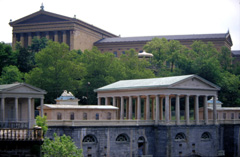
The Phildadelphia Museum of Art

A drawing of a caveman looking into a mirror

Paley Library’s latest pictorial exhibition will feature the works of award-winning photographer Salvatore C. DiMarco, Jr. and illustrator Gilbert J. Tucker, both of whom worked for the Philadelphia Evening Bulletin. The exhibition’s photographs, illustrations, and editorial cartoons are all part of the George D. McDowell Philadelphia Evening Bulletin Collection, which the Temple Libraries acquired after the newspaper ceased publication in 1982. Founded in 1847, the Bulletin published a daily afternoon edition for over 125 years. For decades, the newspaper’s signature slogan was “Nearly everybody reads the Bulletin.” The event is sponsored by the Temple University Libraries’ Urban Archives Department and Friends of the Libraries. An online version of the exhibition, featuring highlights, also opens May 3rd.

About the artists:

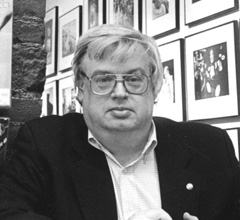
sal.jpgSalvatore C. DiMarco, Jr. was born in 1947 in Drexel Hill, PA. He learned photography from his father, a portrait painter in Philadelphia. In 1970, he graduated with a B.S. degree from the School of Communications and Theater at Temple University. Mr. DiMarco first joined the staff of the Philadelphia Evening Bulletin in 1967 as a summer intern. He eventually became Chief Photographer, overseeing a department of more than 30 photographers, editors, and technicians. After the Bulletin closed in 1982, he became a free lance photographer and divided his time between editorial, corporate and industrial magazine assignments. His photographs have appeared in many of the world’s leading magazines, including Time, and he won more than 150 international, national and regional awards for his work. He passed away on June 11, 2004.


gilbert.jpgGilbert J. Tucker was born in Philadelphia in 1930. From an early age, he showed an interest in illustration. Upon graduating from Simon Gratz High School, he was awarded a scholarship to the Philadelphia School of Industrial Art, now called The University of the Arts. In 1951, he graduated from the Philadelphia School of Industrial Art with a diploma in illustration. Later, he continued his education at the Philadelphia Museum College of Art, where he received a Bachelor of Fine Arts degree in 1962. After working for a number of years as a technical and commercial illustrator, Mr. Tucker joined the staff of the Philadelphia Evening Bulletin‘s Editorial Art Department from 1968 to 1980. There, he was able to exercise the full range of his abilities by providing illustrations to accompany articles and editorials. Since retiring in 1993, he devotes much of his time to watercolor painting, including landscapes and cityscapes around Philadelphia and the New Jersey shore.

Vanderbilt TV News Archive now available

The Libraries have just subscribed to TV NewsSearch, the database of The Vanderbilt University Television News Archive. Through this subscription, Temple users have access to over 705,000 records describing the news content of the Archive’s extensive collection. In addition, you can access online video from the Archive’s collection of CNN material. In order to view the video, you will need to download the free RealOne media player from Real Networks. The Archive’s entire collection holds more than 30,000 individual network evening news broadcasts from the major U.S. national broadcast networks: ABC, CBS, NBC (since 1968), and CNN (since 1995). It also includes more than 9,000 hours of special news-related programming including ABC’s Nightline since 1989, presidential press conferences and political campaign coverage, and significant national and international events.