How Can We Help?
Sign In to the Concur Mobile App
With the SAP Concur Mobile app, you’re able to create expense reports and upload receipts directly from your smart phone. Follow these steps to sign in to the Concur mobile app.
1. Get Your Username
- Sign in to TUportal
- Go to Concur
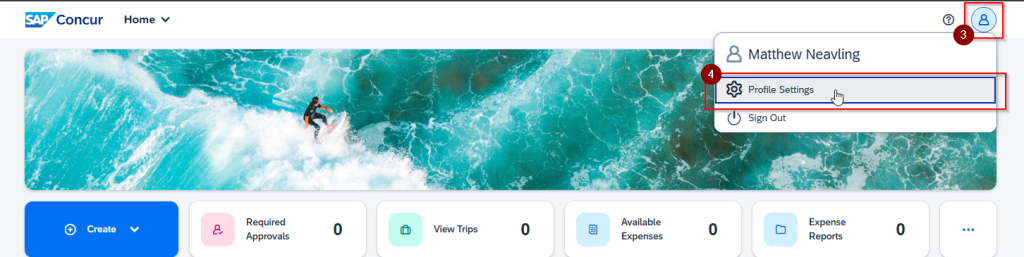
- In the top right corner of your Concur dashboard, click on the “User” icon
- Click on “Profile Settings”
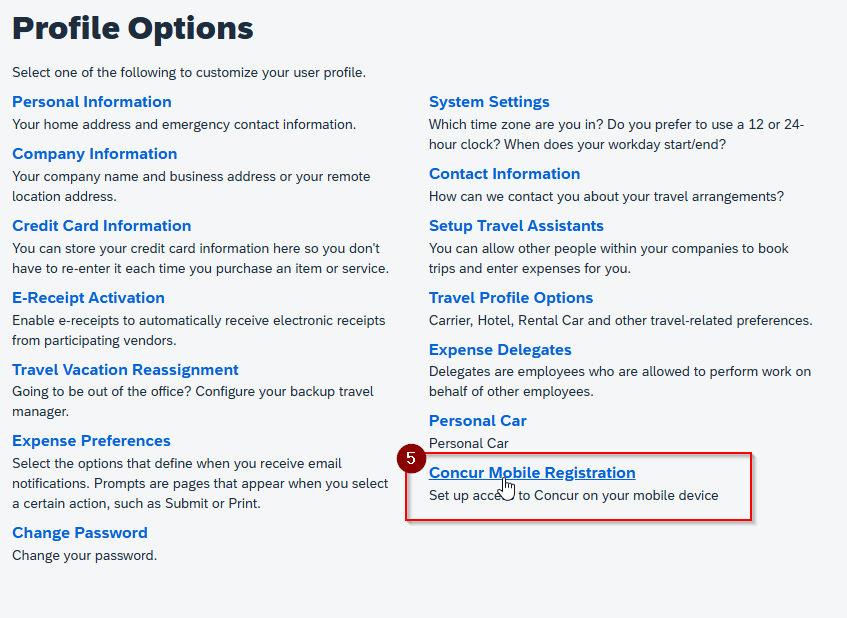
- Click on “Concur Mobile Registration”
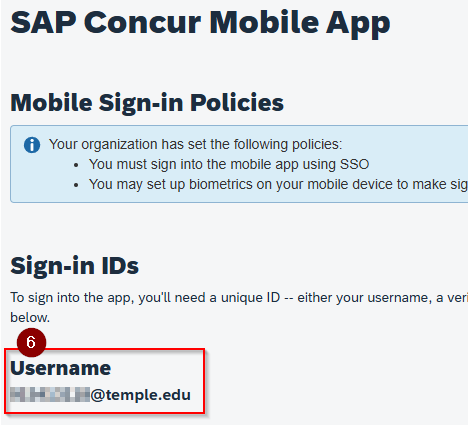
- Under “Sign-in IDs” you should see an email under “Username” consisting entirely of numbers. You will use this email address as your username in the mobile app.
2. Log in to the Concur App
- Download the SAP Concur app from the app store for your brand of phone.
- Launch the app and enter the Username you found in step 1 to log in.
- Complete the tuportal sign in.