How Can We Help?
Download Videos from the Web with VLC Media Player
Due to changes in YouTube’s system, downloading from YouTube through VLC is currently unavailable.
Videos add variety to a presentation, but unreliable Wi-Fi and inevitable buffer times can delay playback. Storing the video on your hard drive ahead of time circumvents internet issues.
VLC is a very popular and trusted video playback program. If it’s not already installed on your device, you can download the installer here.
Download a Video
Once you open VLC media player:
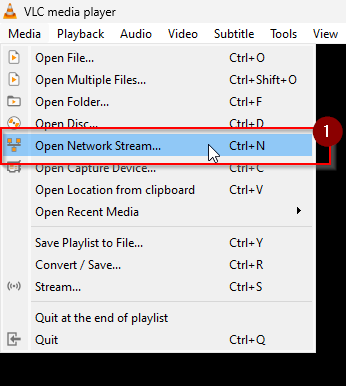
- Go to Media → Open Network Stream…
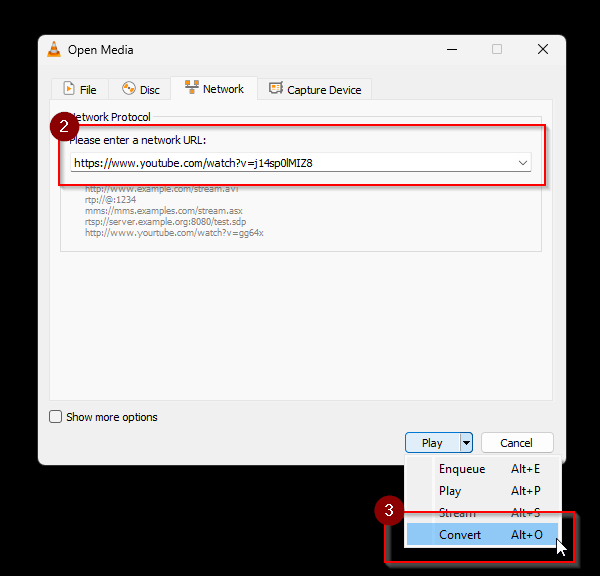
- Enter the URL of the YouTube video you want to download.
- Click the carat next to “Play” and select “Convert” .
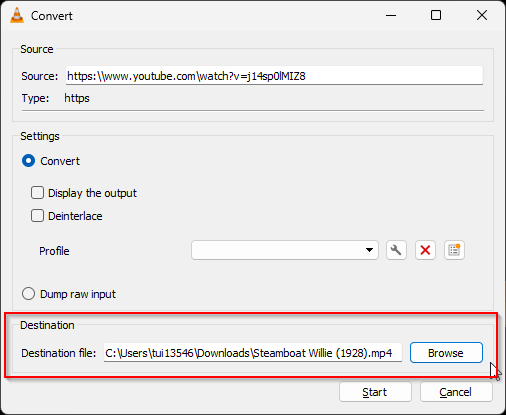
- Click “Browse” to select the location to save the video, and enter the name under which you want to save the video in “File name”.